

Document reference numbers
Establish a recognisable reference numbering system for each document type in your Sales Desk.
Each document type in your Sales Desk has its own sequential numbering system. This includes reference numbers for Enquiries, Quotations, Orders, Invoices, Refunds and Shipments.
When you first start your online store, Evance defaults all document numbers to 1. However, this may not be desirable. You can change the next number for each type by going to Settings -> Sequential order/receipt numbers.
Prefixes & suffixes
In addition to its numeric value, each reference number may have a prefix and/or suffix. We recommend utilising these settings
to make each document type easily identifiable based on its reference. To avoid issues with other applications, prefix/suffix
values should be limited to alpha characters A-Z, separators should be limited to dashes
-or underscores _. Avoid special or multi-byte characters.
Recognising the type of document from its reference helps with efficient customer communication.
Existing invoicing systems
If you already have an offline order/invoicing system, or have other businesses, we recommend differentiating the reference numbers in Evance from your existing system - allowing you to recognise which of your brands the order was placed with, and that it was placed online.
Example
The example below utilises both the prefix and suffix fields, but you can utilise either depending on your preference.
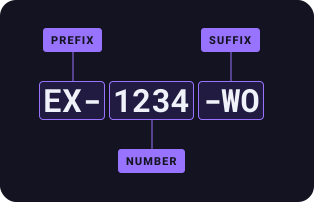
In the example above, the reference number is prefixed by EX- allowing us to recognise the number belongs to our Example
brand. Meanwhile the -WO suffix identifies the number belongs to a Web Order document.