

Smart Links
Inject a page, category, product or external web page into the hierarchy of your website's page structure.
The structure of your website is maintained by hierarchy. Sometimes this can feel limiting if a page needs to appear in multiple places. Smart Links avoid the need to duplicate content and allow external links to appear part of your site's navigation.
Smart links allow:
- an existing page to appear elsewhere in your site's structure.
- a product or category to appear as a child of a page.
- an external web page to appear as if it is part of your website.

Linking to internal content
An existing page, product or category may appear in multiple places within the CMS page hierarchy by utilising Smart Links.
- Go to Content / Pages in the left-hand navigation
- Click on the + icon on any page to add a Page or Smart Link as a child.
- Click on Smart Link. You'll be taken to a "Add a smart link" screen.
- "Internal link" will be selected by default.
- Enter or search for the page you would like to link to.
- Click "Save".
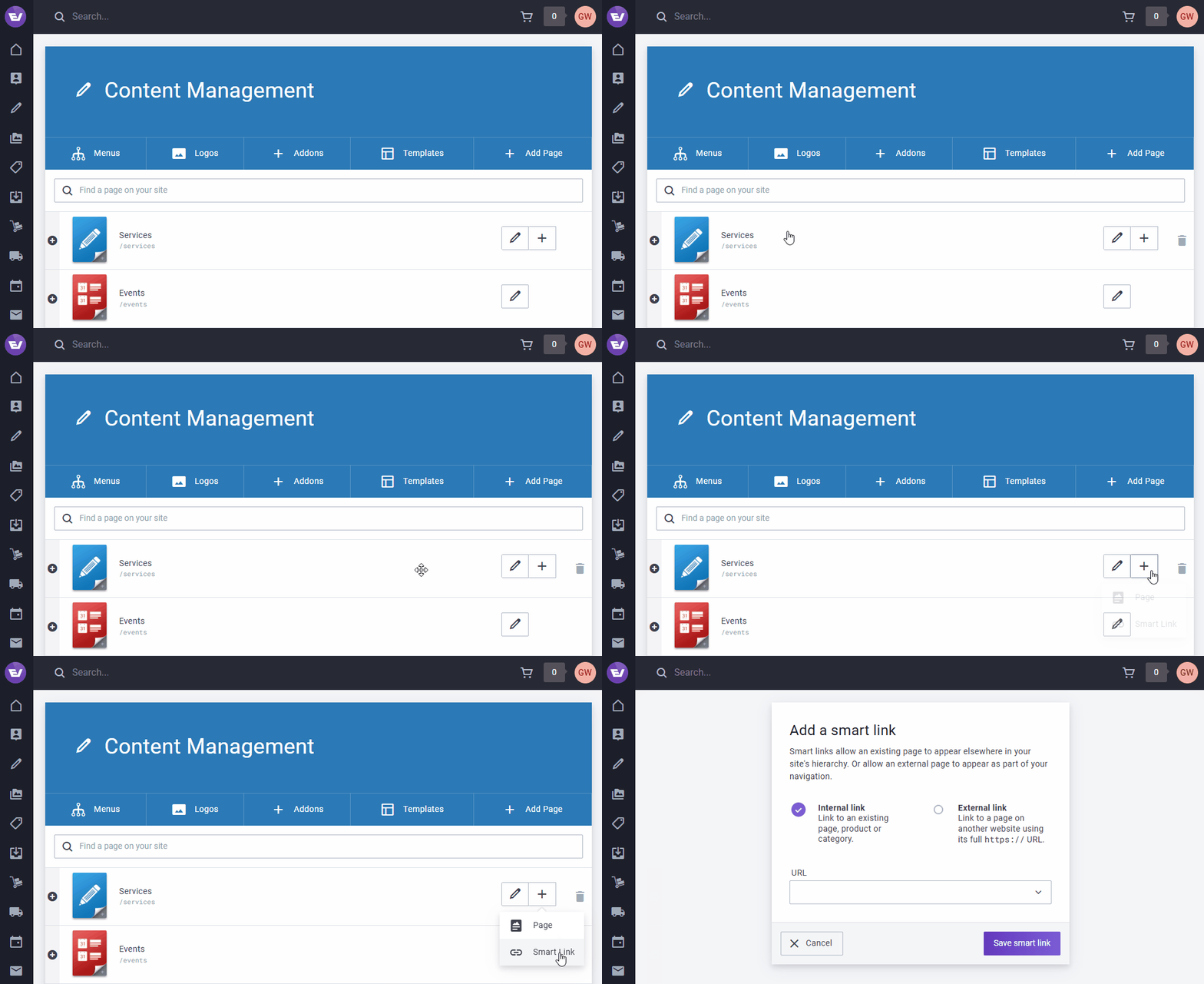
Smart Links relating to existing content will automatically update when their original content changes. They'll also automatically be removed if the original page, category or product is removed.
Linking to external content
You can inject a link to an external web page into your site's page hierarchy/navigation.
- Go to Content / Pages in the left-hand navigation.
- Click on the + icon on any page to add a Page or Smart Link as a child.
- Click on Smart Link. You'll be taken to a "Add a smart link" screen.
- Click on the "External link" option. In addition to URL, the ability to enter a title, description and thumbnail will appear.
- Enter the full URL of the external page including the
https://prefix. - Click "Save" when you're happy with your settings.
Unlike internal links, external links do not automatically update when the external content changes or becomes unavailable.
Limitations
Smart Links have some intended limitations:
- Smart Links cannot be added to the root structure of your site. They may only be added as a child of an existing Page.
- To avoid duplication issues, your site's search and XML sitemap exclude smart links.
- Internal page, category and product Smart Links inherit the title, description and thumbnail of the linked content. These properties cannot be customised.
- By default, Smart Links representing a Product exclude product data such as pricing, variants or star ratings. However, your developer can adapt your theme to accommodate linked Product data.
- Smart Links are only permitted in the Page hierarchy. They are not supported in Category hierarchy (yet).
- Pages with a template configured not to accept child pages do not permit smart links to be added as a child.