

Category Entries API v2
Category entries manage the association between a Products and Categories.
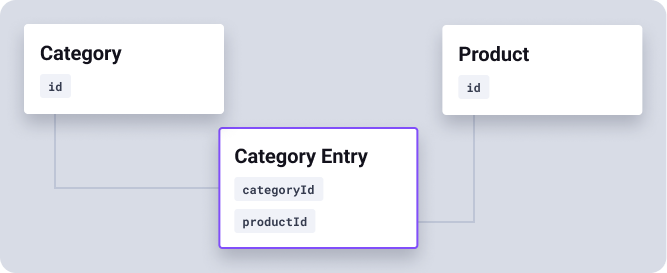
A product may be assigned to more than one category, but may not be assigned to a category more than once. This API allows you to:
- Get entries associated with one or more categories
- Get entries associated with one or more products
- Sequence product entries within a category
- Define the default entry for a product
Scopes
Access to the Category Entries API requires that the client have the following scopes granted:
products- Permits write access to add, update or remove entries.products.readonly- Read only access to search or get entry data.
The Category Entry object
Category entries maintain the association between products and categories.
A Product may be associated with zero or more Categories, but may not be associated with a category more than once. Category
Entries are sequenced relative to the categoryId.
categoryId
An unsigned 64-bit integer representing the associated Category. |
createdBy
An integer representing the Contact ID who created the Category Entry. This may be set to null if
the Category Entry was created by an App or via import. |
createdOn
When the association between a product and category was added in ISO-8601 format (e.g. 2024-07-09T17:53:55+01:00) |
id
read-only
An unsigned 64-bit integer, the unique id for the Category Entry. |
isDefault
A boolean value which determines the default category for a product - a product may have zero or one default product category entry. Since a product may be assigned to multiple categories, the default entry may be used when rendering breadcrumbs on a product page, for example. |
modifiedBy
An integer representing the Contact ID who last modified the Category Entry. This may be set to null if
the Category Entry was modified by an App or via import. |
modifiedOn
When the association between a product and category was last modified in ISO-8601 format (e.g. 2024-07-09T17:53:55+01:00) |
productId
An unsigned 64-bit integer representing the associated Product. |
sequence
An integer representing the position of the Product within a Category when the Category has a If no sequence is supplied when entering a product into a category it will be placed last in the list. Supply a value of 1 to be entered first in the list. For managing sequence see Entry Sequence below. The sequence value is only effective on categories where filtering is not enabled, or where a category does not have child categories when filtering is enabled. |
Entry Uniqueness
Whilst products may be assigned to multiple categories, a product (productId) may only
be associated with a category (categoryId) once.
Entry Sequence
The position of products within a category is represented by the sequence property.
When importing data you may adjust the sequence of an entry by supplying either an integer (starting from 1) or a position
object containing placement and id properties.
When supplying an integer, existing entries with a sequence greater than or equal to the sequence supplied will increment by one. If you supply a sequence number greater than the current number of entries, your entry will be positioned last and the appropriate sequence number will be recalculated and returned as part of the response.
Alternatively, you may supply a position object consisting of the following properties:
placement
May be one of the following:
|
id
Required when placement is either before or
after. Represents the ID of another Category Entry for the same Category. |
Example
The example below shows a request to position the entry before another with ID 1234.
{
    "data": {
        "sequence": {
            "placement": "before",
            "id": 1234
        }
    }
}
List/search Category Entries
GET
/api/v2/categories/entries.json
Requires either the products or products.readonly OAuth scope.
Query parameters
categoryId:in
Return entries matching a comma-separated list of Category IDs. |
id:in
Return entries specified within a comma-separated list of Entry IDs. |
id:min
Return entries with an Entry ID greater than or equal to that specified. |
id:max
Return entries with an Entry ID less than or equal to that specified. |
id:after
Return entries with an Entry ID greater than that specified. |
id:before
Return entries with an Entry ID less than that specified. |
productId:in
Return entries matching a comma-separated list of Product IDs. |
JSON response
Evance will return a JSON object containing the following properties:
success
A successful search request containing zero or more results will always return a true value.
|
status
An integer matching the HTTP response code. A successful request will have a status of 200.
|
data
An array containing zero or more Category Entry objects. |
pagination
Search results include a pagination object contain information about the current page, total pages, the limit per page and the total number of results available.
|
links
An object containing links to traverse available search results.
|
Example JSON response
{
    "success": true,
    "status": 200,
    "data": [
        {
            "id": 1463,
            "categoryId": 423,
            "productId": 5432,
            "sequence": 1,
            "isDefault": false,
            "createdOn": "2019-11-09T01:02:00+00:00",
            "createdBy": 314,
            "modifiedOn": "2019-11-09T01:02:00+00:00",
            "modifiedBy": 314
        },
        {
            "id": 1467,
            "categoryId": 423,
            "productId": 5438,
            "sequence": 2,
            "isDefault": false,
            "createdOn": "2019-11-09T01:02:00+00:00",
            "createdBy": 314,
            "modifiedOn": "2019-11-09T01:02:00+00:00",
            "modifiedBy": 314
        },
        {
            "id": 1574,
            "categoryId": 423,
            "productId": 6845,
            "sequence": 3,
            "isDefault": false,
            "createdOn": "2019-11-09T01:05:00+00:00",
            "createdBy": 314,
            "modifiedOn": "2019-11-09T01:05:00+00:00",
            "modifiedBy": 314
        }
    ],
    "pagination": {
        "page": 1,
        "limit": 100,
        "total": 3,
        "totalPages": 1
    },
    "links": {
        "self": "https://examples.evance.me/api/v2/categories/entries.json",
        "previous": null,
        "next": null
    }
}
Get a single Category Entry
GET
/api/v2/categories/entries/{id}.json
Retrieve a single Category Entry item using its ID.
Requires either the products or products.readonly OAuth scope.
URL parameters
id
required
The ID of the Category Entry is supplied as a path parameter. |
Response
Returns an object with the following properties:
success
A boolean where a value of true represents a successful request.
|
status
The HTTP status code e.g. 200 for a successful request.
|
data
Contains the Category Entry object. |
Example JSON response
{
    "success": true,
    "status": 200,
    "data": {
        "id": 1467,
        "categoryId": 423,
        "productId": 5438,
        "sequence": 2,
        "isDefault": false,
        "createdOn": "2019-11-09T01:02:00+00:00",
        "createdBy": 314,
        "modifiedOn": "2019-11-09T01:02:00+00:00",
        "modifiedBy": 314
    }
}
Add a Product to a Category
POST
/api/v2/categories/entry.json
Associate a product with a category by adding a new Category Entry.
Requires the products OAuth scope.
Request body
Your request body must contain an object including:
data
required
Containing a Category Entry object. |
Example JSON request
The minimum requirements for an entry is a categoryId and productId.
{
    "data": {
        "productId": 4252,
        "categoryId": "842
    }
}
Success response
If the Category Entry was created successfully you should receive a response with a 201 status
code:
success
A boolean where a value of true means the object was created successfully.
|
status
The HTTP status code e.g. 201 means the object was created successfully. |
data
Contains the Category Entry object you created including its new id. |
Error responses
If the Category Entry could not be created you will encounter a response with a 422 status code:
success
A boolean where a value of false means the object could not be created.
|
status
A response code of 422 means the object could not be created and you should
check the errors property for further information. |
context
The context property indicates where the error occurred. For a 422 error this
will typically contain a value of data, indicating that there was an error
with the data object supplied. |
errors
Contains an array of error objects, each will have the following properties:
|
Update a Category Entry
PUT
/api/v2/categories/entries/{id}.json
Update an existing Category Entry item by its ID.
Requires the products OAuth scope.
URL parameters
Your request must provide the following URL parameters:
id
required
The ID of your Category Entry object |
Request body
Your request body must contain an object including:
data
required
Containing updates to your Category Entry object Updates are typically limited to the isDefault and sequence property.
|
Example JSON request
To update a Category Entry item you must PUT JSON to this resource within a data object.
You do not need to supply all properties and may choose to only supply properties that require modifying.
{
    "data": {
        "isDefault": true
    }
}
Success response
If the object was updated successfully you should receive a response with a 200 status code:
success
A boolean where a value of true means the object was saved successfully.
|
status
The HTTP status code e.g. 200 means the object was updated successfully. |
data
Contains the Category Entry object you updated. |
Error responses
If the object could not be updated you will encounter a response with either a 400, 404 or
422status code:
success
A boolean where a value of false means the object could not be updated.
|
status
|
context
|
errors
Contains an array of error objects, each will have the following properties:
|
Delete a Category Entry
DELETE
/api/v2/categories/entries/{id}.json
Remove the association between a product and a category.
Requires the products OAuth scope.
URL parameters
id
required
The ID of your Category Entry object |
Request body
Does not require a payload
Success response
If the Category Entry was deleted successfully you should receive a response with a 204 status
code and no body.
Error responses
If the Category Entry could not be deleted you may encounter a response with a 400, or
404status code:
success
A boolean where a value of false means the object could not be deleted.
|
status
|